Table of Contents
- From the Principal’s Office to the CEO Suite
- The Reflection: Audit Your Current Business “Feel”
- The Framework: Designing Your Non-Negotiables
- Inside the CEO Dashboard: Tools for Leadership, Not Just Productivity
- The Magic of Task Blocks and Hyperlinked Workflows
- Managing Your Assets: Your Brand’s Central Nervous System
- Conclusion: From Firefighter to Visionary
- Frequently Asked Questions
From the Principal’s Office to the CEO Suite
For 25 years, my life was dictated by the minute. As a school principal, my schedule was a fortress of prep periods, welcome activities, and bell schedules. When I transitioned into the entrepreneurial world, I realized that while the bells had stopped ringing, the need for alignment hadn’t.
In the online business space, it is incredibly easy to let the “chaos” take over. We trade a structured 8-to-5 for a 24/7 reactive cycle where we are constantly putting out fires, responding to DMs, and duct-taping our systems together. But here is the truth: your business will only grow to the level of the systems you have in place to support it.
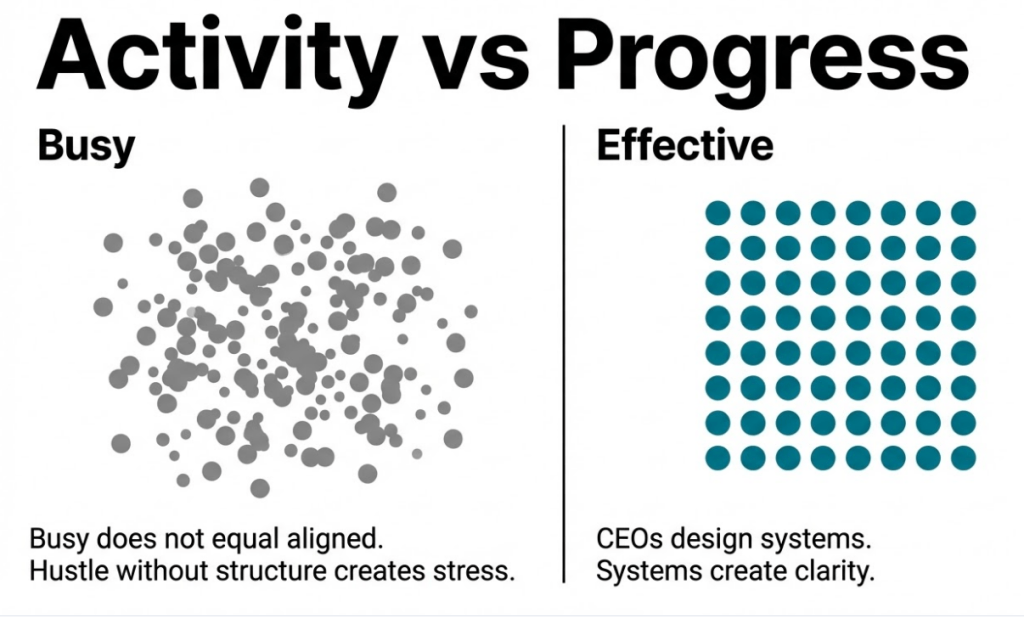
The goal isn’t just to be “busy”—it’s to create a structure that works in alignment with your flow, your energy, and your goals. This is where the CEO Dashboard comes in.
The Reflection: Audit Your Current Business “Feel”
Before we dive into the tech, we have to start with a moment of radical honesty. I want you to sit with these three questions:
- How does your business feel right now? When you sit down to work, do you feel clear about what matters, or do you feel pulled in ten different directions?
- How do you feel at the end of the day? Are you satisfied and accomplished, or do you feel like you spent the whole day being reactive without actually moving the needle?
- What is working against you? What parts of your current schedule are quietly draining your energy?
If you feel like you “can’t breathe” because of the sheer volume of components in your business, you aren’t alone. Transitioning from “Hustle without Structure” to “CEO Clarity” requires a tool that doesn’t just list tasks but guides your leadership.
The Framework: Designing Your Non-Negotiables
To move from reactive to proactive, you must identify your non-negotiables. These are the activities that, if done consistently, guarantee growth. Using AI, we can set these into motion. Consider categorizing your needs into three buckets:
- Daily Intentions: Focus on the “Three Rocks”—the three things that must happen today for you to feel successful. This might include making two new connections or sharing a story on social media.
- Weekly Systems: This is where the heavy lifting happens. It includes long-form content creation (like a blog or video), a weekly email to your list, and a calendar review to block off your time.
- Monthly Review: This is your “Leadership Time.” Reviewing Key Performance Indicators (KPIs), analyzing financials, and hosting a masterclass to stay in front of your audience.
Inside the CEO Dashboard: Tools for Leadership, Not Just Productivity
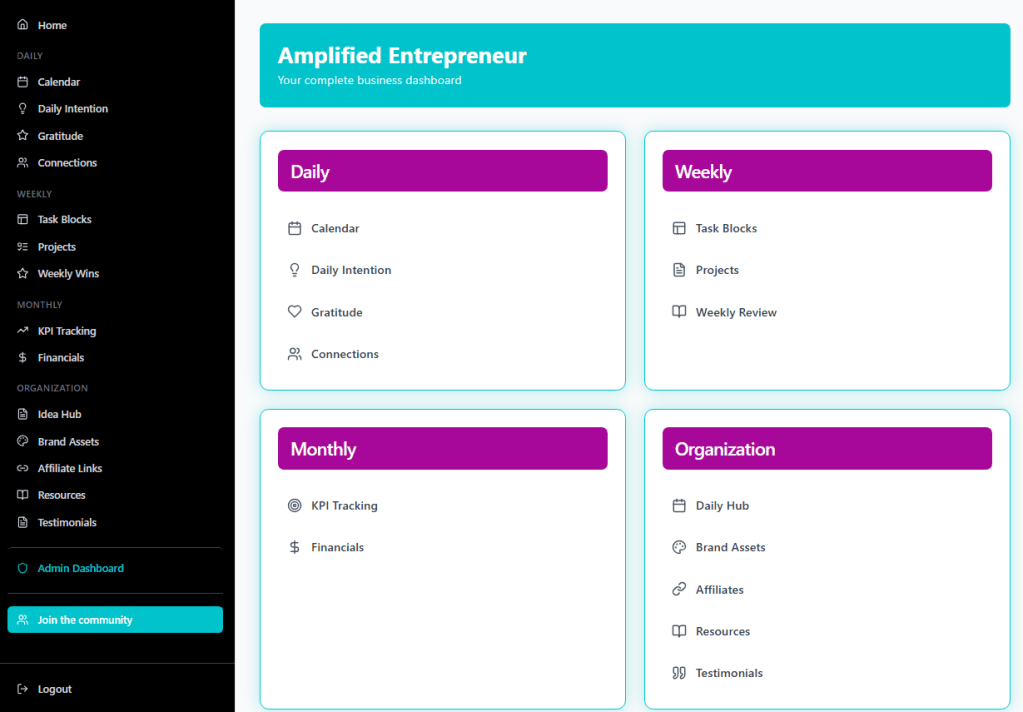
I recently built a custom CEO Dashboard to house all these moving parts in one place. Using a “vibe coding” approach, I’ve integrated several key leadership features:
The Personal CRM (The Hot List) Stop losing leads in your DM requests. A dedicated connections space allows you to track follow-ups, save social profiles, and keep a “hot list” of people you need to reach out to. It’s a simplified pipeline that ensures the “fortune in the follow-up” doesn’t slip through the cracks.
The Project Brainstormer We all have “Idea Debt”—those projects we want to start but haven’t because the steps feel overwhelming. My dashboard includes an AI-powered brainstormer. You can speak your idea into the tool, and it will automatically generate a task list and a project folder, taking the concept from your head to a structured plan in seconds.
Gratitude and Wins Leadership is as much about mindset as it is about metrics. A dedicated space for daily gratitude and weekly wins ensures you are celebrating progress, which prevents the burnout that comes from only ever looking forward.
The Magic of Task Blocks and Hyperlinked Workflows
The most powerful feature of an AI-integrated dashboard is the Task Block.
Think about a recurring task, like sending your weekly newsletter. Usually, this involves opening five different tabs: your content plan, your email service provider, your image editor, and your link tracker. Each click is a “brain drain.”
In the CEO Dashboard, you can create a template for these workflows. When you block off time on your calendar for “Newsletter,” one click opens every single hyperlinked resource you need for that specific task. You aren’t just scheduling time; you are optimizing your cognitive load.
Managing Your Assets: Your Brand’s Central Nervous System
How much time do you spend hunting for a hex code or a specific affiliate link? A true CEO dashboard acts as your brand’s central nervous system.
- Brand Assets: Store your colors, logos, and headshots.
- Affiliate Links: A searchable database for the tools you recommend.
- Resource Hub: A place to store the courses you’re taking and the tools you use, searchable by keyword or creator.
Conclusion: From Firefighter to Visionary
Building a CEO Dashboard isn’t about finding another way to “do more.” It’s about creating a space where you can stop being the bottleneck in your business. By using AI to streamline your systems, you reclaim the “breathing room” needed to actually lead your business rather than just working in it.
Ready to stop the tech overwhelm and start your day with clarity?
[Get Your Own CEO Dashboard Here] For just $49, you can subscribe to the exact CEO Dashboard app I’ve built—complete with the calendar, project brainstormer, and asset trackers—and start transforming your chaos into clarity today.
Frequently Asked Questions
Does this dashboard integrate with Google Calendar? Yes! The dashboard is designed to connect directly with your Google Calendar, allowing you to see your events and your daily priorities in one central hub.
Can I use this on my mobile phone? Absolutely. The dashboard is optimized for mobile. You can bookmark it on your home screen to record voice-to-text ideas, check your daily intentions, or access a brand link while you’re on the go.
I already use a tool like ClickUp or Asana. Do I need this? While project management tools are great for granular task tracking, the CEO Dashboard is a “Leadership Tool.” It focuses on your high-level intentions, brand assets, and quick-access links that often get buried in complex project management software.
What if I want to customize the sections? The beauty of “vibe coding” and the tools I use is that they are built to be flexible. If you are part of our coaching community, we can look at how to adapt the dashboard to fit your specific business needs.

 AI Coaching with Angelina
Leave a comment